POS
From the cart's Order Options, issue an invoice with a tax ID, apply a ready-made discount or ring up a staff meal.
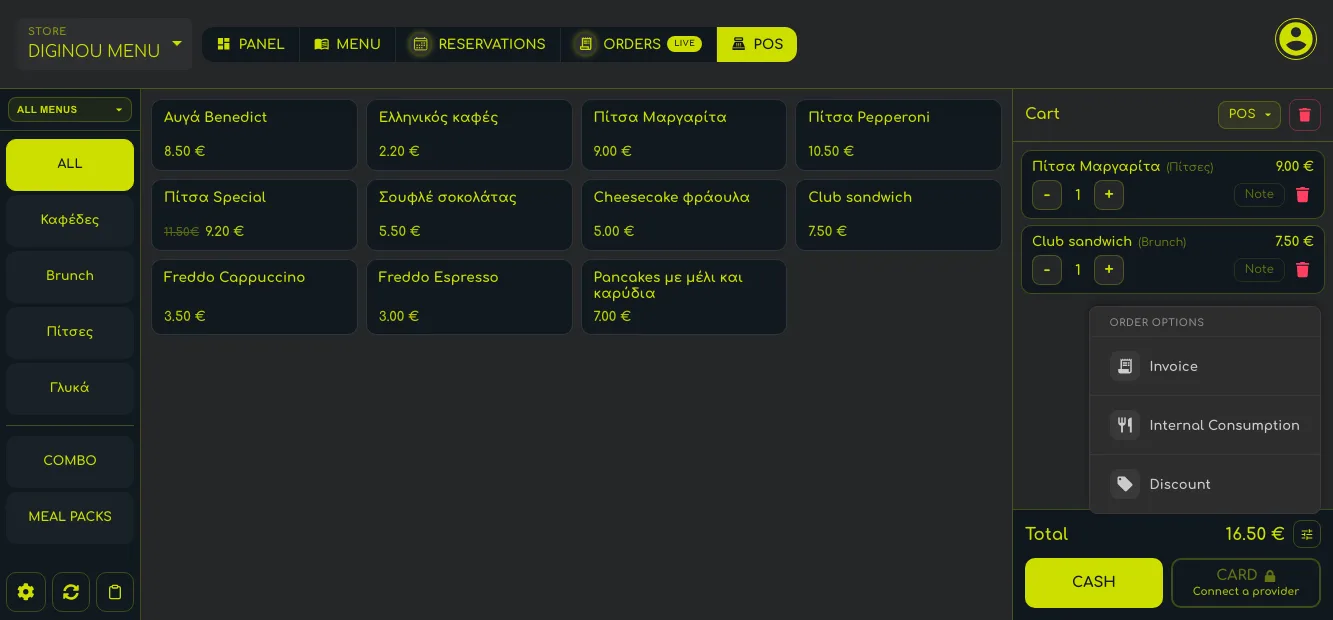
Next to the cart's Total, the sliders icon opens Order Options: Invoice, Internal Consumption and Discount. Whatever you set shows as a card above the total and applies to this sale only. With an invoice, the sale's fiscal document is an invoice instead of a receipt. Internal consumption issues no fiscal document.
WHERE TO FIND IT
POS → CART → ORDER OPTIONS
⤢ Enlarge
The cart’s “Order Options”: Invoice, Internal Consumption and Discount.
In Order Options, press Invoice.
Choose the Country, enter the Tax ID and, if you like, press Validate Tax ID. With Valid Tax ID., the company name and address are filled in from the EU VAT register (VIES), as far as it gives them.
Press Next, fill in Company Name, Address, City and Postal Code, plus Activity and Tax Office if you like. Press Save Changes.
In Order Options, press Discount. Under Select discount you see the store's POS discounts.
Those that don't fit the cart are greyed out with the reason, such as the minimum order or Takes nothing off this cart.
Pick one, check Subtotal, Discount and New Total, and press Save Changes. To take it off, open it again and press Remove.
In Order Options, press Internal Consumption. It says Active and a card appears above the total.
Charge as usual. No fiscal document is issued, and with cash no payment is recorded.
To undo it, press its card (the ✕) or Internal Consumption again.
TIP
POS discounts are created by the owner and managers under DISCOUNTS, with the type POS Discount. If there are none, the window says No discounts available for this store. with a Create discount button. With Auto Issue Receipt — POS Orders on, a sale with an invoice issues an invoice by itself.
WATCH OUT
An invoice and internal consumption don't go together: while one is on, the other says Not with internal consumption or Not with an invoice. If you change the cart and the discount no longer fits, its card says Does not apply and charging stops with The discount does not apply. A discount with Exclude items on offer takes nothing off combos, Meal Packs and products on offer. After the sale everything is cleared, and the invoice details are not kept for another order.




