ORDER INTAKE
See which customers come often and, if you like, give them an automatic discount when they reach a goal.
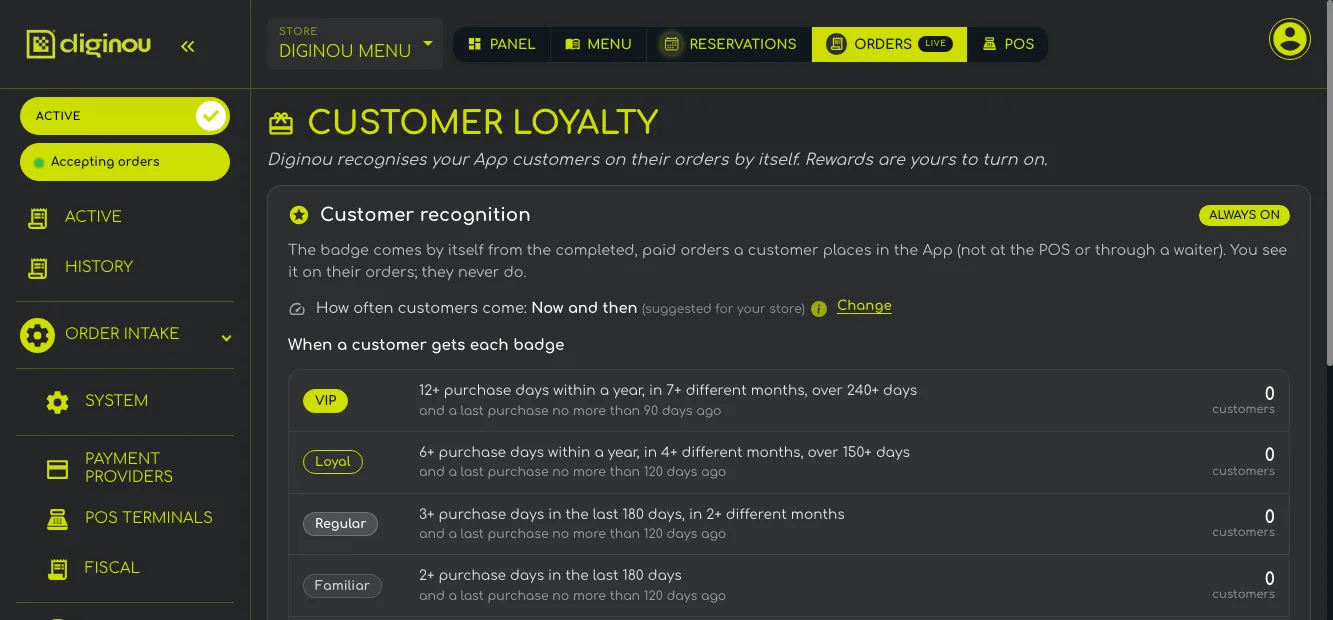
CUSTOMER LOYALTY covers the store selected under STORE and has two parts. Customer recognition is Always on. Every App customer gets a badge that only staff see: New, Familiar, Regular, Loyal or VIP. Automatic rewards stay off until you turn them on. When a customer reaches a goal, they automatically get a discount on their next app order, with no code, within a monthly budget.
WHERE TO FIND IT
ORDERS → ORDER INTAKE → CUSTOMER LOYALTY
⤢ Enlarge
“Customer Loyalty”: recognition, and when a customer gets each badge.
Next to How often customers come, press Change.
Choose Every day, Regularly or Now and then and press Save. Your customers' badges are worked out again within a few minutes.
Press Set up rewards. In the Goal step, choose Number of orders or Total spent, and under Within 30, 60, 90 or 120 days. Quick start fills in ready-made values.
In the Reward step, choose Fixed amount (up to €10) or Percentage (up to 50%, with a cap of up to €10) and set the Least basket (€). What it costs you shows the cost.
In the Who & budget step, set Who can earn it and the Monthly budget (€).
In the Review step, read the sentence your customers will see. Tick Turn rewards on now if you want them to start at once, tick the agreement, and press Save and start or Save.
The switch in Automatic rewards starts or stops rewards; confirm with Start or Stop. If you haven't set terms yet, the switch opens the set-up first.
Under Monthly budget you see what was given, what is held and what is Left. Below it are the counts On their way, Rewards waiting, Used this month and To look at (refunds).
In an order's window, under Customer, you see the customer's badge and how far they are from the reward, such as "Reward: 2 of 4 orders".
TIP
The badge comes by itself from the customer's completed, paid orders in the app, not from the POS or a waiter. You see it on their orders; they never do. A reward lasts 30 days; if it isn't used, the money goes back to the budget. If the order that used the reward is cancelled or refunded, the reward goes back to the customer while it's still valid. In a group order it counts for the organiser.
WATCH OUT
The store pays for the discounts, up to the monthly budget, and only orders from the start onwards count. An order-count goal needs 3 to 50 orders on at least 3 different days, a spend goal at least 2 days. Two orders count only 2 hours apart, and at most 2 a day. The discount applies only to products without a discount of their own (not offers, combos or Meal Packs), and never to more than half of them. It applies only when it's larger than a coupon on the same order; on a tie the coupon stays and the reward waits for later. A cost over 5% needs your confirmation, and over 10% is not allowed. New terms apply to new cycles, while the ones running keep theirs. The page opens for the owner and managers, not for the POS Cashier.




