MENU & PRODUCTS
See how many people open your menu, which products they look at and which they add to the cart.
Statistics shows how customers move through the menu you've selected: how many open it, which products they look at and which they add to the cart, on which device and from which country. The whole page covers one period, and every number is compared with the same-length period before it. On a menu shared by several stores, the numbers are for all of them together.
WHERE TO FIND IT
MENU → STATISTICS
⤢ Enlarge
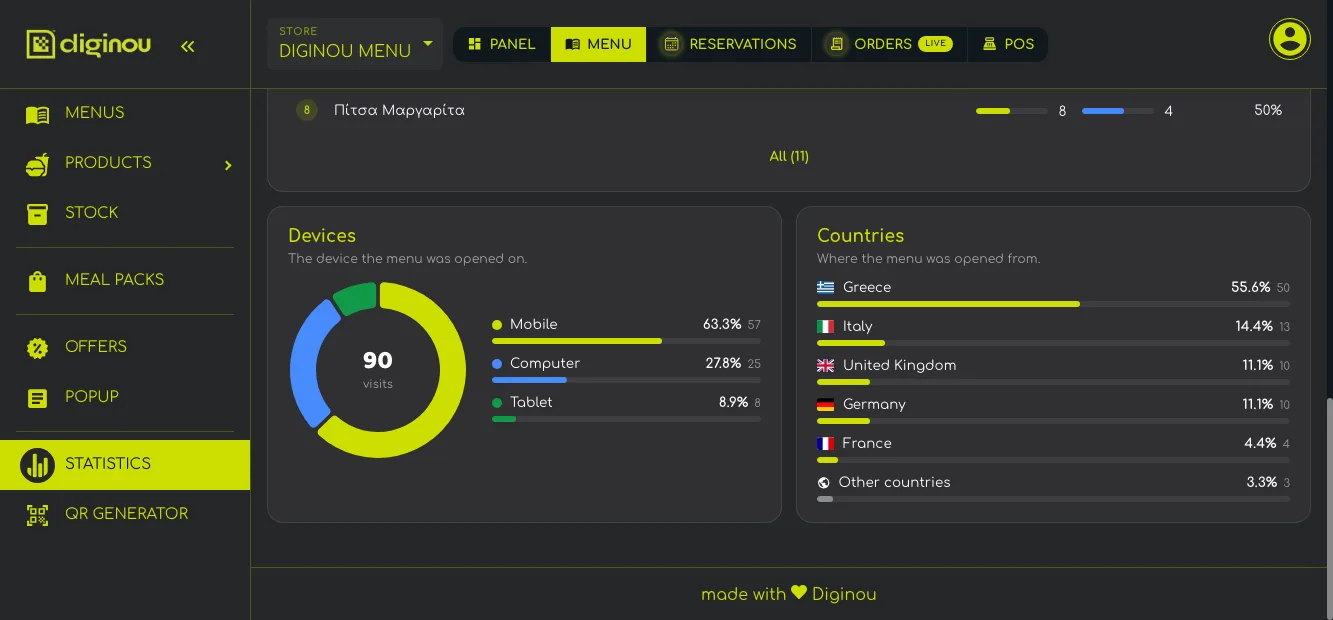
The menu’s “Statistics”: your visitors’ devices and countries.
Choose the menu in the MENU bar.
At the top right, choose 7 days, 30 days, 90 days or Custom. With Custom, set From and To.
Read Menu visits, Product views, Added to cart and Conversion. Under each one, was 120 (for example) is the value for the previous period.
Click one of the first three numbers to see how it went day by day in the chart below.
Top products shows, for each product, Views, In cart and Conversion. Click a heading to sort, and All for the whole list.
Devices and Countries show which device the menu was opened on and where from.
TIP
Conversion is adds to the cart per 100 product views. It can pass 100%, as a product can go in the cart without being opened. A product with many views and a low conversion is one many people look at but few add to the cart.
WATCH OUT
Until customers open the menu from its QR code or link, you see No statistics yet. A box with no data in the period says Nothing in this period. Statistics are kept for as many months as your plan gives, Free 3 and Advanced 12, and older ones are deleted. STATISTICS opens for the owner and managers, not for the POS Cashier.




