ACCOUNT & SUBSCRIPTION
Compare the FREE, ADVANCED and CUSTOM plans and upgrade for more menus, languages and products.
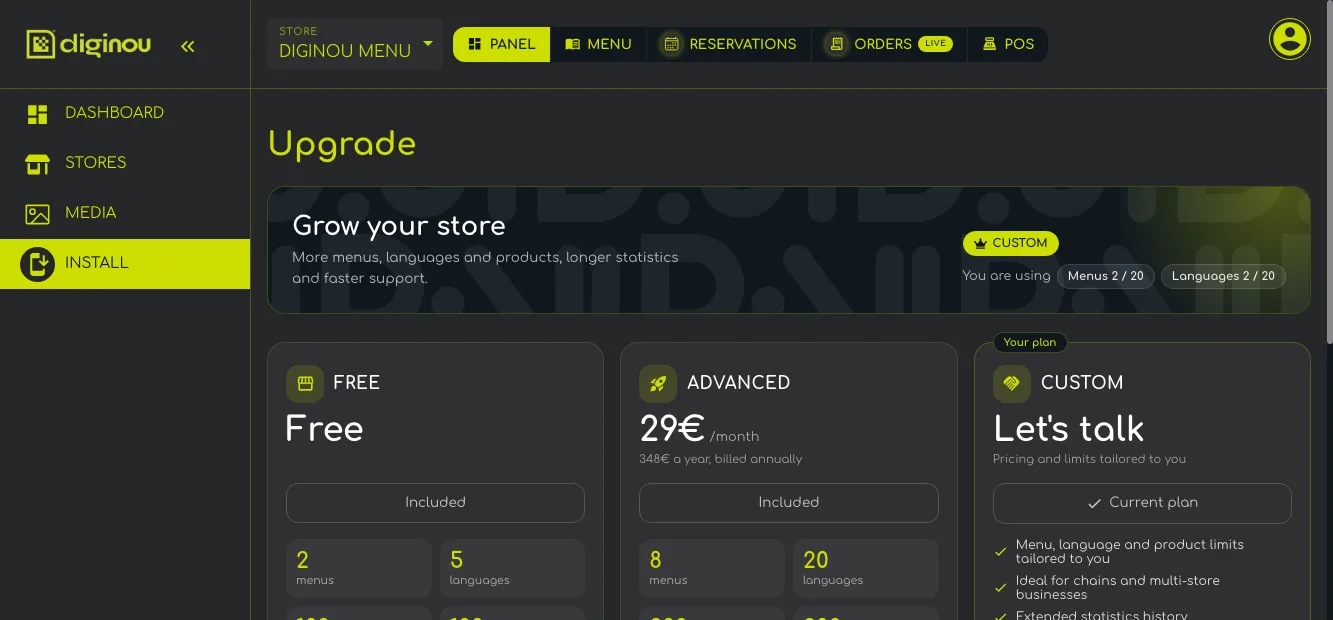
In Upgrade you compare the three plans. FREE is free. ADVANCED costs €29 a month, billed annually at €348. CUSTOM has pricing and limits tailored to you, agreed with Diginou. Each plan sets how many menus, languages per menu, products, variations & ingredients and months of statistics you get: FREE 2 / 5 / 100 / 100 / 3, ADVANCED 8 / 20 / 200 / 200 / 12. Only ADVANCED can be bought online, and only from FREE. You can also open it from the Upgrade for more features box in the side menu.
WHERE TO FIND IT
Account photo (top right) → Upgrade
⤢ Enlarge
“Upgrade”, with the plans side by side and yours marked.
Open Upgrade. At the top, You are using shows the two limits of your plan you have filled the most.
Compare the plans. Your current one reads Your plan, and the next one reads Recommended.
Press Upgrade to ADVANCED. If billing details are missing, fill them in under Add Billing Information and press Save. The purchase then continues by itself.
Pay on the payment page that opens. You then return to My subscription, which shows ADVANCED as soon as the payment is confirmed, usually within a few seconds.
For a chain or many stores, press Contact us on the CUSTOM card.
You agree limits and price with Diginou, and Diginou sets the plan on your account. CUSTOM doesn't expire.
TIP
The In every plan list shows what every plan has, such as unlimited team members, the online ordering system and electronic receipts. The fee on card payments doesn't depend on the plan. Your own account's fee is in the note on the SYSTEM page. If the payment fails, you see Payment failed. Press Try again to go back to Upgrade.
WATCH OUT
You can't move to a smaller plan from here: smaller plans read Included. Upgrade in the account menu and the Upgrade box in the side menu show only while you are on FREE. CUSTOM can't be bought online. Only the owner can open Upgrade.




