POS
Work with the till alone, without online orders: what to set up and what to leave off.
The POS works without online orders. You need a store and a menu with your products. Viva Wallet is needed for card payments and for electronic receipts; a cash-only till without myDATA receipts doesn't need it. The order system stays off or on Digital menu only — orders go through the waiter, and the till sells as usual. Neither a pause nor your opening hours ever stop the POS.
WHERE TO FIND IT
ORDERS → ORDER INTAKE → SYSTEM · POS
⤢ Enlarge
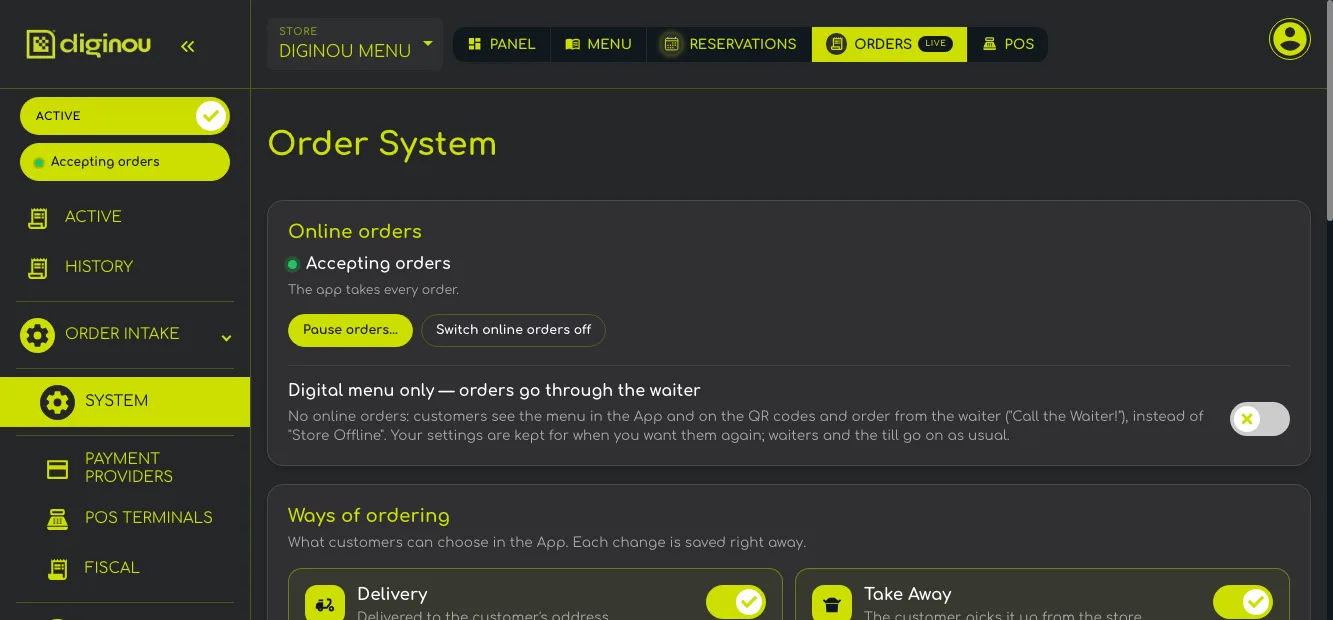
The “Order System”: “Switch online orders off” stops the App, while the POS keeps selling.
Create the store and a menu with your products. The POS shows the active, visible products of all the store's menus, including a menu that is not active.
For card, the owner connects Viva Wallet under Payment Providers and you choose a terminal in the POS. For cash only, you don't need it.
For receipts, set up FISCAL, which also needs Viva connected. Then, under PRINTER, switch on Auto Issue Receipt — POS Orders and press Save Changes.
From your photo → Users → New user, add your cashiers with the POS Cashier role and give them the store under Stores. They land straight in the POS.
Under SYSTEM, if there is no system yet, press Create Order System. It is created switched off, with every way of ordering disabled.
If you want customers to see the menu in the App and on the QR codes, switch on Digital menu only — orders go through the waiter. If you leave it off, the switch in the side menu says INACTIVE and the App shows the store offline.
In the POS the order type stays POS. The others say disabled while online orders are off.
Click your photo at the top right, then Settings.
Under Tabs in the top bar, switch off the tabs you don't need and leave POS on. With only the POS showing, the panel opens straight on the till on this device.
TIP
If you never create an order system, the POS still sells, but above the products it says No Order System. Once you create one, even switched off, the message goes away. Hiding tabs changes only this device's view: every page still opens from its link.
WATCH OUT
With online orders off, the POS takes direct sales (POS) only, with no Take Away, Delivery or Dine In. Those types open at the till only when they are active in the order system, so the App takes them too. A POS sale is completed as soon as it is paid: it never goes through ACTIVE and prints no kitchen ticket by itself. You find it under POS Orders → Completed. SYSTEM and Users open for the owner and managers; Payment Providers and FISCAL for the owner only.




